60-Inch L-Shaped Desk: Drawers + Power + USB Ports
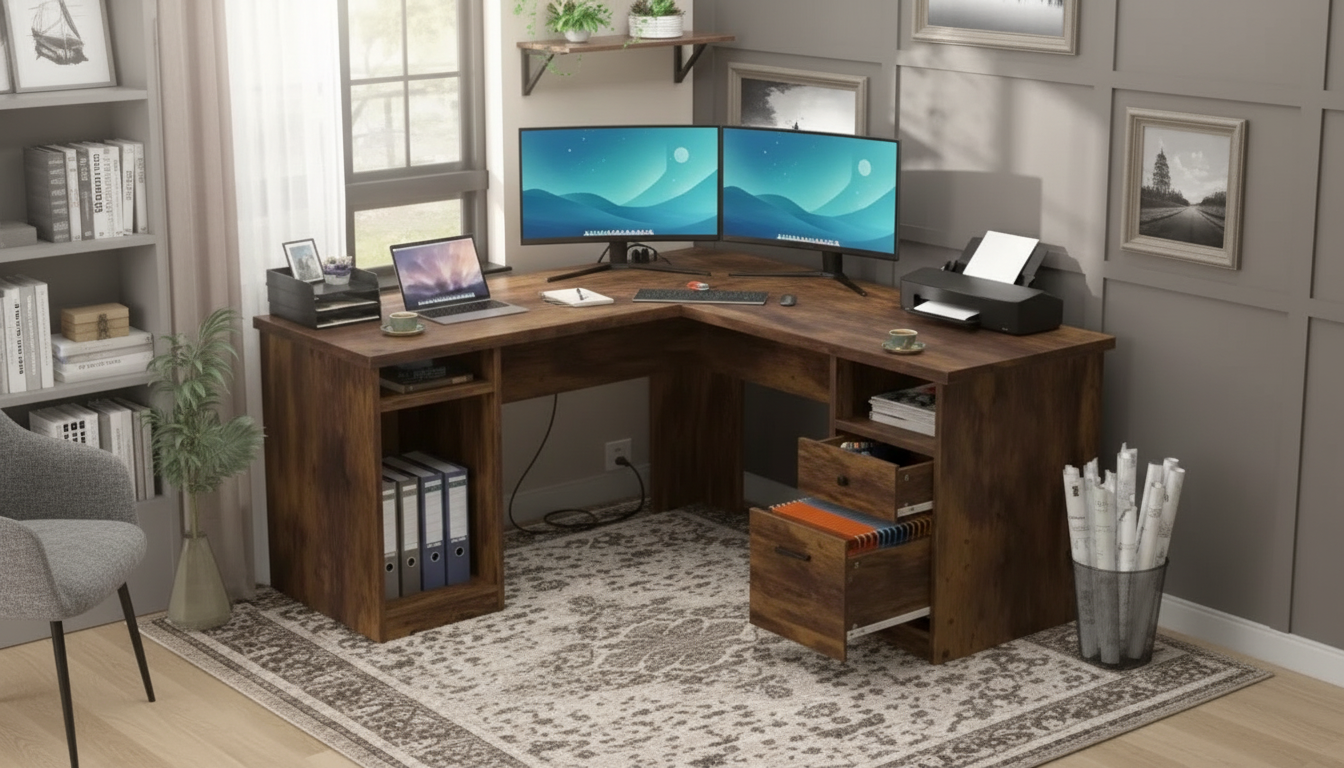
60-Inch L-Shaped Office Desk with Drawers, Power Outlet, and USB Charging Ports
A 60-inch L-shaped desk can turn an unused corner into a high-functioning workspace, especially when storage and built-in charging reduce clutter. This layout is designed for multitasking—spreading out monitors, paperwork, and devices—while keeping everyday essentials close at hand. With the right setup, an L-shaped desk becomes a “command center” that stays clean, powered, and ready for long work sessions.
Why an L-Shaped Layout Works for Busy Workstations
An L-shaped desktop offers a corner-friendly footprint that helps maximize floor space while expanding usable surface area. Instead of pushing a long rectangle into the middle of the room, the L design tucks into a corner and creates a wide, wraparound work zone.
- Corner-friendly footprint that helps maximize floor space while expanding usable surface area
- Natural zoning: one side for computer work, the other for writing, planning, or peripherals
- Helpful for dual-monitor setups, printer placement, or separating work and personal devices
- Improves cable routing options by keeping power and device hubs closer to walls
That “zoning” advantage is a big deal: keep your keyboard and primary monitor on one run, and use the other run for notes, a drawing tablet, a label printer, or a charging station. The result is fewer piles and less shuffling every time your task changes.
Built-In Power Outlet and USB Charging: A Cleaner Setup
When power is built into the desk, your setup can feel instantly more intentional. Instead of a floor power strip collecting dust (and tugging at cords), you can plug in where you work and route cables along the back edge.
- Reduces reliance on floor power strips and minimizes visible cable sprawl
- Convenient charging access for phone, tablet, headset, controller, or desk lamp
- Supports a “plug-in once” routine to keep devices topped up during the workday
- Pairs well with cable clips or sleeves to keep cords routed along the back edge
Desk Power Features Checklist
| Feature | Why it matters | Quick tip |
|---|---|---|
| AC power outlet access | Keeps laptop/monitor plugs off the floor | Route the thickest cables first to avoid tangles |
| USB charging ports | Charges small devices without extra bricks | Use short cables to reduce clutter |
| Cord routing path | Prevents cables from crossing the work surface | Secure with adhesive clips along the rear panel |
| Surge protection (if included) | Helps protect electronics from spikes | Confirm specs on the product page before connecting high-value gear |
For additional guidance on charging and compatibility, the FCC’s consumer overview of USB chargers is a helpful reference for understanding safe charging basics.
Drawer Storage That Actually Reduces Desktop Clutter
Drawers are most useful when they remove “visual noise” from your workspace. A clean desktop makes it easier to focus, and it also makes quick cleanups realistic between meetings or study blocks.
- Dedicated space for pens, notebooks, chargers, and small tech accessories
- Helps maintain an “open surface” for focused work and easier cleaning
- Supports quick resets between meetings by giving everything a consistent home
- Organize by frequency: daily items in top drawer, rarely used items below
Size and Room Fit: Planning Around 60 Inches
Quick Room-Planning Guide
| Planning item | Recommended check | Why it helps |
|---|---|---|
| Walkway clearance | Ensure comfortable chair slide-out space | Prevents daily friction and scuffs |
| Drawer swing/access | Verify drawers open fully without hitting walls | Keeps storage practical, not decorative |
| Outlet location | Map the nearest wall outlet | Avoids extension-cord tangles |
| Monitor placement | Set screen distance and angle before finalizing | Supports better posture and reduces neck strain |
Comfort and Ergonomics for Long Sessions
Practical ergonomics guidance is available from both the OSHA Computer Workstations eTool and the Mayo Clinic office ergonomics guide.
Assembly, Care, and Everyday Maintenance
Featured Desk Option
For a corner workstation that prioritizes both organization and charging convenience, the 60-Inch L-Shaped Office Desk with Drawers, Power Outlet, and USB Charging Ports combines a spacious L layout with integrated drawers and built-in power. It’s a strong fit for home offices, study corners, and mixed work-and-gaming setups where multiple devices need a consistent place to plug in.
Product Snapshot
| Item | Details |
|---|---|
| Product | 60-Inch L-Shaped Office Desk with Drawers, Power Outlet, and USB Charging Ports |
| Price | 425.17 USD |
| Availability | In stock |
| Best for | Corner workspaces, multi-device charging, organized desktop routines |
Additional In-Stock Picks for a More Functional Setup
- Wireless Silver Gaming Controller with Charging Dock for Switch, PC & iPad — a docked charging option that pairs nicely with a powered desk to keep accessories off the work surface.
- AI Tips to Elevate Your Writing Voice | Editable Writing Tone Checklist — a handy reference for writers setting up a dedicated drafting and editing zone on the second side of an L-shaped desk.
- AI Newsletter Wizard – Ultimate Editable Checklist for Email Creators — a workflow companion for planning, outlining, and producing content from a clean, organized workspace.
FAQ
How much space is needed for a 60-inch L-shaped desk?
Measure both wall runs that form the corner and confirm the desk’s orientation (left- or right-facing). Leave enough room for your chair to slide back comfortably and for drawers to open fully without hitting walls or furniture.
Can monitors and a laptop be powered and charged from the built-in outlet and USB ports?
Typically, AC outlets handle laptops and monitors, while USB ports are best for phones, headsets, and small accessories. Check the desk’s power module specifications and avoid overloading by plugging in only what the unit supports.
Where should the desk be placed to reduce cable clutter?
Place it close to a wall outlet so the main power cord stays short and tucked away. Route cables along the back edge using clips or sleeves, and store spare chargers in a drawer when they’re not actively needed.















Leave a comment